terraform-aws-arc-redshift
Module:
sourcefuse/arc-redshift/awsRegistry: https://registry.terraform.io/modules/sourcefuse/arc-redshift/aws
Category: Analytics / Data Warehouse
Source: https://github.com/sourcefuse/terraform-aws-arc-redshift




Tip
🤖 New: Use this module with AI assistants via the ARC IaC MCP Server — search, scaffold, and security-scan ARC modules from natural language. Quick setup ↓
Overview
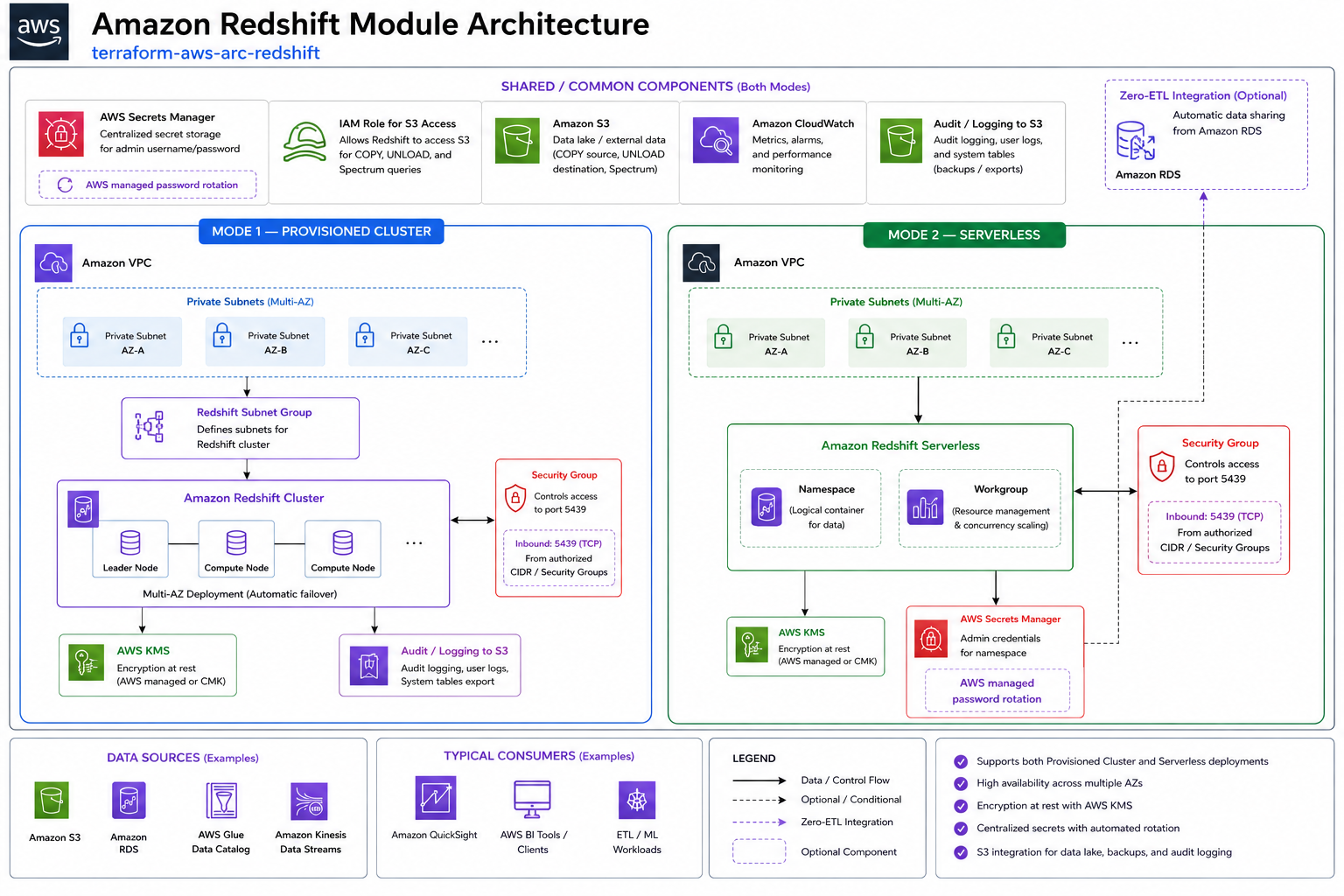
Creates Amazon Redshift clusters or Redshift Serverless workgroups with VPC, encryption, parameter groups, and snapshot management.
Architecture
What It Does
- Redshift provisioned cluster or Serverless workgroup
- VPC and security group configuration
- KMS encryption at rest
- Parameter groups for cluster tuning
- Automated snapshots and cross-region copy
- IAM roles for S3 and Glue integration
- Enhanced VPC routing
For more information about this repository and its usage, please see Terraform AWS Redshift Module Usage Guide.
Quickstart
Required Inputs
| Name | Type | Description |
|---|---|---|
namespace |
string |
Namespace prefix |
environment |
string |
Deployment environment |
vpc_id |
string |
VPC ID |
subnet_ids |
list(string) |
Subnet IDs |
database_name |
string |
Initial database name |
master_username |
string |
Master username |
| ## Key Outputs |
| Name | Description |
|---|---|
cluster_endpoint |
Redshift cluster endpoint |
cluster_id |
Redshift cluster identifier |
| ## Full Variable & Output Reference |
The complete inputs/outputs reference is auto-generated below.
Requirements
| Name | Version |
|---|---|
| terraform | >= 1.5.0 |
| terraform | >= 1.5.0 |
| aws | ~> 5.0 |
| random | ~> 3.1 |
Providers
| Name | Version |
|---|---|
| aws | 4.67.0 |
Modules
| Name | Source | Version |
|---|---|---|
| redshift_cluster | ./modules/redshift-cluster | n/a |
| redshift_serverless | ./modules/redshift-serverless | n/a |
Resources
| Name | Type |
|---|---|
| aws_caller_identity.current | data source |
Inputs
| Name | Description | Type | Default | Required |
|---|---|---|---|---|
| additional_security_group_ids | Additional security group IDs to be added to the Redshift Serverless workgroup. | list(string) |
[] |
no |
| admin_password | n/a | string |
null |
no |
| admin_username | Admin username for the Redshift Serverless namespace. | string |
"admin" |
no |
| allow_version_upgrade | If true, major version upgrades can be applied during maintenance windows | bool |
true |
no |
| automated_snapshot_retention_period | The number of days that automated snapshots are retained | number |
7 |
no |
| base_capacity | The base data warehouse capacity in Redshift Processing Units (RPUs) | number |
32 |
no |
| cluster_identifier | The Cluster Identifier | string |
null |
no |
| cluster_parameter_group_name | The name of the parameter group to be associated with this cluster | string |
null |
no |
| cluster_subnet_group_name | The name of a cluster subnet group to be associated with this cluster. If not specified, a new subnet group will be created | string |
null |
no |
| cluster_type | The cluster type to use. Either 'single-node' or 'multi-node' | string |
"single-node" |
no |
| config_parameters | A list of configuration parameters to apply to the Redshift Serverless namespace. | list(object({ |
[] |
no |
| create_random_password | Determines whether to create random password for cluster master_password |
bool |
true |
no |
| create_security_groups | Whether to create security groups for Redshift Serverless resources | bool |
true |
no |
| database_name | The name of the database to create | string |
n/a | yes |
| egress_rules | A list of egress rules for the security group. | list(object({ |
[] |
no |
| enable_serverless | Enable Redshift Serverless. If true, creates the serverless module; if false, creates the standard cluster module. | bool |
false |
no |
| encrypted | If true, the data in the cluster is encrypted at rest | bool |
true |
no |
| enhanced_vpc_routing | If true, enhanced VPC routing is enabled | bool |
false |
no |
| environment | Name of the environment, i.e. dev, stage, prod | string |
n/a | yes |
| final_snapshot_identifier | The identifier of the final snapshot that is to be created immediately before deleting the cluster | string |
null |
no |
| ingress_rules | A list of ingress rules for the security group. | list(object({ |
[] |
no |
| kms_key_id | The ARN for the KMS encryption key | string |
null |
no |
| manage_admin_password | If true, Redshift will manage the admin password | bool |
false |
no |
| manage_user_password | Set to true to allow RDS to manage the master user password in Secrets Manager | bool |
null |
no |
| master_password | Password for the master DB user. If null, a random password will be generated | string |
null |
no |
| master_username | Username for the master DB user | string |
n/a | yes |
| max_capacity | The maximum data warehouse capacity in Redshift Processing Units (RPUs) | number |
512 |
no |
| name | Name for the Redshift resources | string |
n/a | yes |
| namespace | Namespace of the project, i.e. arc | string |
n/a | yes |
| namespace_name | The name of the Redshift Serverless namespace | string |
null |
no |
| node_type | The node type to be provisioned for the cluster | string |
"dc2.large" |
no |
| number_of_nodes | Number of nodes in the cluster | number |
1 |
no |
| port | The port number on which the cluster accepts incoming connections | number |
5439 |
no |
| publicly_accessible | If true, the cluster can be accessed from a public network | bool |
false |
no |
| security_group_data | (optional) Security Group data | object({ |
{ |
no |
| security_group_name | Redshift Serverless resourcesr security group name | string |
"Redshift-Serverless-sg" |
no |
| skip_final_snapshot | Determines whether a final snapshot of the cluster is created before Redshift deletes it | bool |
false |
no |
| snapshot_identifier | The name of the snapshot from which to create the new cluster | string |
null |
no |
| subnet_ids | List of subnet IDs for the Redshift subnet group | list(string) |
[] |
no |
| tags | Tags to apply to resources | map(string) |
{} |
no |
| track_name | Optional track name for Redshift Serverless (used for versioning or preview tracks). | string |
null |
no |
| vpc_id | ID of the VPC for Redshift | string |
null |
no |
| vpc_security_group_ids | A list of Virtual Private Cloud (VPC) security groups to be associated with the cluster | list(string) |
[] |
no |
| workgroup_name | The name of the Redshift Serverless workgroup | string |
null |
no |
Outputs
| Name | Description |
|---|---|
| redshift_cluster_arn | The ARN of the Redshift cluster |
| redshift_cluster_database_name | The name of the default database in the Redshift cluster |
| redshift_cluster_endpoint | The connection endpoint for the Redshift cluster |
| redshift_cluster_hostname | The hostname of the Redshift cluster |
| redshift_cluster_id | The ID of the Redshift cluster |
| redshift_cluster_namespace_arn | The ARN of the Redshift cluster |
| redshift_cluster_port | The port of the Redshift cluster |
| redshift_cluster_security_group_id | The ID of the security group associated with the Redshift cluster |
| redshift_database_name | The name of the database in the Redshift deployment |
| redshift_endpoint | The endpoint of the Redshift deployment (either cluster or serverless) |
| redshift_serverless_endpoint | The endpoint URL for the Redshift Serverless workgroup |
| redshift_serverless_namespace_arn | The ARN of the Redshift Serverless namespace |
| redshift_serverless_namespace_id | The ID of the Redshift Serverless namespace |
| redshift_serverless_workgroup_arn | The ARN of the Redshift Serverless workgroup |
| redshift_serverless_workgroup_id | The ID of the Redshift Serverless workgroup |
| redshift_subnet_group_id | The ID of the Redshift subnet group |
Versioning
This project uses a .version file at the root of the repo which the pipeline reads from and does a git tag.
When you intend to commit to main, you will need to increment this version. Once the project is merged,
the pipeline will kick off and tag the latest git commit.
Development
Prerequisites
Configurations
- Configure pre-commit hooks
Versioning
while Contributing or doing git commit please specify the breaking change in your commit message whether its major,minor or patch
For Example
Tests
- Tests are available in
testdirectory - Configure the dependencies
- Now execute the test
AI Assistant Integration (ARC IaC MCP)
The ARC IaC MCP Server is a hosted Model Context Protocol service that lets AI assistants browse, search, scaffold, compare, and security-scan any of the SourceFuse ARC Terraform modules — directly from natural language.
What you can do with it:
- Discover — search and filter modules by keyword or AWS resource type.
- Understand — get inputs, outputs, and resources for any module without leaving your editor.
- Scaffold — generate production-ready, multi-file Terraform with cross-module wiring already done.
- Secure — scan generated or existing HCL for misconfigurations before it hits a PR.
- Compare — diff modules side-by-side to make informed architectural decisions.
Setup (one minute)
The MCP endpoint is https://arc-iac-mcp.sourcef.us/mcp. Pick your client:
Claude Code CLI:
Claude Desktop — edit ~/Library/Application Support/Claude/claude_desktop_config.json:
Cursor / Windsurf / Kiro — add the same block to .cursor/mcp.json (or the equivalent for your client).
Example prompts to try
- "List all ARC modules sorted by downloads"
- "What inputs does
arc-ecsrequire?" - "Scaffold a production-ready
arc-dbAurora setup with Secrets Manager" - "Compare
arc-eksandarc-ecsfor running 10 microservices" - "Scan this Terraform before I raise a PR:
<paste HCL>"
See the ARC IaC MCP repo for the full tool reference, troubleshooting tips, and local-development instructions.
Contributing
See CONTRIBUTING.md for commit conventions and development setup.
Authors
This project is authored by: - SourceFuse ARC Team